Kesko Design System’s webfont package ships the Skatta Sans UI typeface as ready-to-use @font-face declarations alongside the webfont files.
Installation #
To install Kesko Design System fonts as a dependency in your project, run:
npm install @kesko/fontspnpm add @kesko/fontsyarn add @kesko/fontsbun add @kesko/fontsCDN usage #
The stylesheet and the font files it references can also be loaded straight from the Kesko CDN, without installing anything or serving the fonts yourself. Add the tag below to the <head> of your page to get the latest version:
<link
  rel="stylesheet"
  href="https://cdn.kesko.design/fonts/1.4.0/fonts.css"
  integrity="sha384-A0eOfKcNfSzeIy9Apx4mIBkE+qYt9JrbXsRiiBWPtoRKxEO0Dh2qIuHXi9DYWCFV"
  crossorigin="anonymous"
/>
See the CDN guidelines for more details, including how to preload a single webfont.
Bundler usage #
If you import the stylesheet through your bundler, url() references are resolved automatically and the font files are emitted into your build output. No copy script or font path override is required:
/* src/main.css */
@import "@kesko/fonts/dist/fonts.css";

body {
  font-family: var(--k-font-family-sans);
}
/* src/global.css */
@import "tailwindcss";
@import "@kesko/fonts/dist/fonts.css";
@theme {
--font-sans: var(--k-font-family-sans);
}// src/main.scss
@use "@kesko/fonts/dist/fonts.scss";
body {
font-family: var(--k-font-family-sans);
}// webpack.config.js. Only needed if your setup doesn't already
// handle font files (most framework starters do)
module.exports = {
module: {
rules: [
{ test: /\.css$/i, use: ["style-loader", "css-loader"] },
{ test: /\.(woff2?|ttf)$/i, type: "asset/resource" },
],
},
};/* src/styles.css */
@import "@kesko/fonts/dist/fonts.css";
body {
font-family: var(--k-font-family-sans);
}Vite and Parcel handle woff2, woff, and ttf files out of the box. Webpack 5+ and Rspack need an asset/resource rule for font extensions in addition to CSS. Framework starters like Next.js, Create React App, Nuxt, and Vue CLI include this rule by default, so you only have to add it yourself for a bare Webpack config.
Once that’s in place, upgrading the package (pnpm upgrade @kesko/fonts) is the only step needed to pick up new font files moving forward.
Next.js usage #
Next.js (App Router and Pages Router, via Webpack or Turbopack) handles font files automatically. Import the stylesheet from your global CSS and reference the design token:
/* app/globals.css */
@import "@kesko/fonts/dist/fonts.css";

body {
  font-family: var(--k-font-family-sans);
}
Next.js fingerprints, hashes, and caches the font files automatically. Add <link rel="preload"> tags manually for fastest first paint (see Performance).
Don’t combine @kesko/fonts with next/font/local #
next/font/local does not register fonts under their literal family name. It generates a hashed name like __skattaSansUI_a1b2c3 and exposes it only through a CSS variable, so it cannot share @font-face rules with @kesko/fonts.
Use @kesko/fonts instead by removing any localFont({…}) and the matching variable class from <body>, and reference the typeface using var(--k-font-family-sans). You keep the metrics-matched fallback that ships with @kesko/fonts and lose only Next.js’s automatic preload tags, which you can re-add in <head> (see Performance).
CSS usage #
Import the provided stylesheet in your document’s <head>:
<link rel="stylesheet" href="/assets/fonts/fonts.css" />Then set the font-family via design tokens:
font-family: var(--k-font-family-sans);SCSS usage #
Import at the beginning of your main SCSS file using @use with the with() clause to set the path to the provided font files:
@use "@kesko/fonts/dist/fonts.scss" with (
  $k-font-path: "/assets/fonts"
);
You can also override the font-display strategy. Supported values are auto, block, swap (default), fallback, and optional:
@use "@kesko/fonts/dist/fonts.scss" with (
  $k-font-path: "/assets/fonts",
  $k-font-display: auto
);
Less usage #
Set the font path variable before importing the stylesheet:
@k-font-path: "/assets/fonts";
@import "@kesko/fonts/dist/fonts.less";
You can also override the font-display strategy:
@k-font-path: "/assets/fonts";
@k-font-display: auto;
@import "@kesko/fonts/dist/fonts.less";
Options #
The SCSS and LESS outputs expose two options that can be overridden:
| Option | Default | Description |
|---|---|---|
$k-font-path / @k-font-path | "." | Path to the directory containing the font files. Adjust when the fonts are served from a CDN or a different relative path. |
$k-font-display / @k-font-display | swap | CSS font-display strategy. See MDN font-display. |
The plain CSS output has no options, if you need path customisation, use the SCSS or LESS format, or post-process the CSS manually. The same applies when the fonts come bundled in @kesko/css: the path is relative to the stylesheet and font-display is fixed to swap.
Serving the fonts #
The font files need to be available at the path you have specified. How you achieve this depends on your build setup. If you’re using a more traditional setup instead of a bundler, you can copy the font files into your static assets directory as part of your build:
{
  "scripts": {
    "build:fonts": "cp -r node_modules/@kesko/fonts/dist/. public/assets/fonts/"
  }
}
Then link the stylesheet in your HTML:
<link rel="stylesheet" href="/assets/fonts/fonts.css" />Included fonts #
| File | Weight | Style | Stretch |
|---|---|---|---|
SkattaSansUI_TT-Regular | 400 | normal | normal |
SkattaSansUI_TT-RegularItalic | 400 | italic | normal |
SkattaSansUI_TT-Medium | 500 | normal | normal |
SkattaSansUI_TT-MediumItalic | 500 | italic | normal |
SkattaSansUI_TT-Bold | 700 | normal | normal |
SkattaSansUI_TT-Black | 900 | normal | normal |
SkattaSansUI_TT-BoldNarrow | 700 | normal | condensed |
SkattaSansUI_TT-BlackNarrow | 900 | normal | condensed |
Each font ships as .woff, .woff2 and .ttf files.
Performance #
While @kesko/fonts has been optimized with webfont performance best practices, there’re a few additional things worth considering on the consumer side:
1. Ensuring text visibility during load #
The font package ensures this by default with font-display:swap, no need to change any settings. If you want to disable this behaviour, see options.
We also go further than just enabling this, since the package defines a local @font-face rule with size-adjust, ascent-override, descent-override and line-gap-override to closely match the fallback font and the actual webfont to avoid introducing layout shifts. To have this enabled, always set the font-family via design tokens:
font-family: var(--k-font-family-sans);2. Preloading webfonts #
Make sure the webfonts are being preloaded for optimal loading speed to minimize the flash of unstyled text. To achieve this, add the following link elements to the <head> section of the website:
<link rel="preload" href="/assets/fonts/SkattaSansUI_TT-Regular.woff2" as="font" type="font/woff2" crossorigin />
<link rel="preload" href="/assets/fonts/SkattaSansUI_TT-Medium.woff2" as="font" type="font/woff2" crossorigin />
<link rel="preload" href="/assets/fonts/SkattaSansUI_TT-Bold.woff2" as="font" type="font/woff2" crossorigin />
<link rel="preload" href="/assets/fonts/SkattaSansUI_TT-Black.woff2" as="font" type="font/woff2" crossorigin />
You may need to edit the above, depending on which webfonts you are actually using from the package.
3. Configuring caching #
You should always make sure that the webfonts get served through the content delivery network using optimal caching. Here’s an example configuration:
[[headers]]
  for = "*.woff2"
  [headers.values]
    Cache-Control = "max-age=31536000,public,must-revalidate"
4. Offline support #
If your application is a progressive web app, make sure that the webfonts stay functional in case the user’s network connection fails. You can achieve this by caching webfonts in the application’s service worker:
function updateStaticCache() {
  return caches.open(staticCacheName).then(staticCache => {
    return staticCache.addAll([
      "/assets/fonts/SkattaSansUI_TT-Regular.woff2",
      "/assets/fonts/SkattaSansUI_TT-Medium.woff2",
      "/assets/fonts/SkattaSansUI_TT-Bold.woff2",
      "/assets/fonts/SkattaSansUI_TT-Black.woff2",
    ]);
  });
}
Font hinting #
Windows is notorious for its bad font rendering without hinting on low DPI screens, so to combat that, the @kesko/fonts package ships with hinted versions of the Skatta Sans UI fonts. This helps to ensure that the letter forms stay legible for all our users.
Font hinting itself is a process where fonts are adjusted for maximum readability on computer monitors. Hinting makes vector curves render nicely to a grid of pixels by providing a set of guidelines for different sizes. At low screen resolutions hinting is critical for producing clear, legible text.
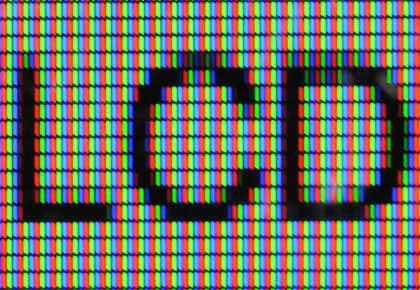
Image credit: Typotheque