Kesko Design Tokens are a tech-agnostic way to store variables. We use tokens instead of hard coded values to ensure a better UI consistency across different platforms.
Theme colors #
| Example | Description | Token |
|---|---|---|
4.73:1 {color.theme.primary} | Color theme # Shorthand for | var(--k-color-theme) |
4.73:1 {color.orange.800} | Color theme primary # Primary theme color used for interactive elements and brand identity. Overridden per brand. | var(--k-color-theme-primary) |
8:1 {color.blue.1000} | Color theme secondary # Secondary theme color used for secondary interactive elements. Overridden per brand. | var(--k-color-theme-secondary) |
1:1 {color.neutral.100} | Color theme inverted # Inverted theme color used for interactive elements placed on dark or colored surfaces. | var(--k-color-theme-inverted) |
15.18:1 {color.purple.1100} | Color theme decorative # Decorative theme color used for illustrative and promotional surfaces. Overridden per brand. | var(--k-color-theme-decorative) |
Highlight colors #
| Example | Description | Token |
|---|---|---|
6.59:1 {color.highlight.primary} | Color highlight # Shorthand for | var(--k-color-highlight) |
6.59:1 {color.orange.900} | Color highlight primary # Emphasis shade of the primary theme color, used for hover and pressed states. | var(--k-color-highlight-primary) |
15.63:1 {color.blue.1100} | Color highlight secondary # Emphasis shade of the secondary theme color, used for hover and pressed states. | var(--k-color-highlight-secondary) |
1.13:1 {color.neutral.300} | Color highlight inverted # Emphasis shade of the inverted theme color, used for hover and pressed states. | var(--k-color-highlight-inverted) |
15.63:1 {color.blue.1100} | Color highlight info # Emphasis shade of the info status color. | var(--k-color-highlight-info) |
6.56:1 {color.green.900} | Color highlight success # Emphasis shade of the success status color. | var(--k-color-highlight-success) |
2.31:1 {color.yellow.700} | Color highlight warning # Emphasis shade of the warning status color. | var(--k-color-highlight-warning) |
8:1 {color.red.1000} | Color highlight error # Emphasis shade of the error status color. | var(--k-color-highlight-error) |
Background colors #
| Example | Description | Token |
|---|---|---|
1:1 {color.bg.base} | Color background # Shorthand for | var(--k-color-bg) |
1:1 {color.neutral.100} | Color background base # Base background color used as the default page surface. | var(--k-color-bg-base) |
1.59:1 {color.neutral.500} | Color background disabled # Disabled background color used for disabled controls. | var(--k-color-bg-disabled) |
1.06:1 {color.neutral.200} | Color background surface # Neutral surface background, one step above the base background. | var(--k-color-bg-surface) |
1.13:1 {color.neutral.300} | Color background panel # Neutral panel background, two steps above the base background. | var(--k-color-bg-panel) |
1.25:1 {color.neutral.400} | Color background container # Neutral container background, three steps above the base background. | var(--k-color-bg-container) |
14.74:1 {color.neutral.1100} | Color background inverted # Inverted background color used for high-contrast surfaces. | var(--k-color-bg-inverted) |
1.12:1 {color.orange.200} | Color background primary # Tinted background color derived from the primary theme color. | var(--k-color-bg-primary) |
1.13:1 {color.blue.200} | Color background secondary # Tinted background color derived from the secondary theme color. | var(--k-color-bg-secondary) |
1.13:1 {color.blue.200} | Color background info # Tinted background color for soft informational messages and inline notes. | var(--k-color-bg-info) |
1.13:1 {color.green.200} | Color background success # Tinted background color for soft success messages and confirmation surfaces. | var(--k-color-bg-success) |
1.09:1 {color.yellow.200} | Color background warning # Tinted background color for soft warning messages and inline cautions. | var(--k-color-bg-warning) |
1.13:1 {color.red.200} | Color background error # Tinted background color for soft error messages and inline validation surfaces. | var(--k-color-bg-error) |
Border colors #
| Example | Description | Token |
|---|---|---|
1.96:1 {color.border.base} | Color border # Shorthand for | var(--k-color-border) |
1.96:1 {color.neutral.600} | Color border base # Default border color used for static borders and outlines. | var(--k-color-border-base) |
3.03:1 {color.neutral.700} | Color border disabled # Disabled border color used for the borders of disabled controls. | var(--k-color-border-disabled) |
6.62:1 {color.blue.900} | Color border focus # Focus border color used to indicate keyboard focus on interactive elements. | var(--k-color-border-focus) |
1.96:1 {color.neutral.600} | Color border divider # Divider border color used to separate content sections and list rows. | var(--k-color-border-divider) |
4.73:1 {color.theme.primary} | Color border primary # Border color derived from the primary theme color. | var(--k-color-border-primary) |
8:1 {color.theme.secondary} | Color border secondary # Border color derived from the secondary theme color. | var(--k-color-border-secondary) |
1:1 {color.theme.inverted} | Color border inverted # Border color derived from the inverted theme color. | var(--k-color-border-inverted) |
6.62:1 {color.status.info} | Color border info # Border color for informational messages and inline notes. | var(--k-color-border-info) |
4.73:1 {color.status.success} | Color border success # Border color for success messages and confirmation surfaces. | var(--k-color-border-success) |
1.64:1 {color.status.warning} | Color border warning # Border color for warning messages and cautions. | var(--k-color-border-warning) |
6.57:1 {color.status.error} | Color border error # Border color for error messages and validation states. | var(--k-color-border-error) |
Overlay colors #
| Example | Description | Token |
|---|---|---|
1:1 {color.overlay.base} | Color overlay # Shorthand for | var(--k-color-overlay) |
1:1 rgba(255, 255, 255, 0.05) | Color overlay base # Translucent white overlay applied on top of an interactive surface. Stored as a raw rgba value because alpha overlays cannot be expressed via primitive palette aliases. | var(--k-color-overlay-base) |
1:1 rgba(0, 0, 0, 0.04) | Color overlay dim # Translucent black overlay applied on top of an interactive surface. Stored as a raw rgba value because alpha overlays cannot be expressed via primitive palette aliases. | var(--k-color-overlay-dim) |
1:1 rgba(0, 0, 0, 0.06) | Color overlay dimmer # Stronger translucent black overlay applied on top of an interactive surface. Stored as a raw rgba value because alpha overlays cannot be expressed via primitive palette aliases. | var(--k-color-overlay-dimmer) |
Status colors #
| Example | Description | Token |
|---|---|---|
6.57:1 {color.red.900} | Color status error # Background color for solid error messages and badges. | var(--k-color-status-error) |
6.62:1 {color.blue.900} | Color status info # Background color for solid informational messages and badges. | var(--k-color-status-info) |
1.64:1 {color.yellow.600} | Color status warning # Background color for solid warning messages and badges. | var(--k-color-status-warning) |
4.73:1 {color.green.800} | Color status success # Background color for solid success messages and badges. | var(--k-color-status-success) |
Text colors #
| Example | Description | Token |
|---|---|---|
14.74:1 {color.text.base} | Color text # Shorthand for | var(--k-color-text) |
14.74:1 {color.neutral.1100} | Color text base # Default text color used for the main body content. | var(--k-color-text-base) |
4.61:1 {color.neutral.800} | Color text dim # Dimmed text color used for muted helper text and metadata. The lightest step of the dim ramp. | var(--k-color-text-dim) |
7.34:1 {color.neutral.900} | Color text dimmer # Further dimmed text color used for less emphasized supporting content. | var(--k-color-text-dimmer) |
10.7:1 {color.neutral.1000} | Color text dimmest # Dimmed text color used for supporting copy and slightly de-emphasized content. The darkest step of the dim ramp. | var(--k-color-text-dimmest) |
3.03:1 {color.neutral.700} | Color text disabled # Disabled text color used for the lowest-emphasis text such as disabled labels. | var(--k-color-text-disabled) |
4.73:1 {color.theme.primary} | Color text link # Link text color that is used for links inside paragraph text. | var(--k-color-text-link) |
6.59:1 {color.highlight.primary} | Color text link dim # Link text color for hover and pressed states. | var(--k-color-text-link-dim) |
4.73:1 {color.theme.primary} | Color text primary # Text color derived from the primary theme color, used for branded inline content. | var(--k-color-text-primary) |
8:1 {color.theme.secondary} | Color text secondary # Text color derived from the secondary theme color. | var(--k-color-text-secondary) |
15.18:1 {color.theme.decorative} | Color text decorative # Text color derived from the decorative theme color. | var(--k-color-text-decorative) |
1:1 {color.theme.inverted} | Color text inverted # Text color derived from the inverted theme color. | var(--k-color-text-inverted) |
1.13:1 {color.highlight.inverted} | Color text inverted dim # Inverted text color for hover and pressed states. | var(--k-color-text-inverted-dim) |
6.62:1 {color.status.info} | Color text info # Text color for informational messages. | var(--k-color-text-info) |
15.63:1 {color.highlight.info} | Color text info dim # Text color for informational messages in hover and pressed states. | var(--k-color-text-info-dim) |
4.73:1 {color.status.success} | Color text success # Text color for success messages. | var(--k-color-text-success) |
6.56:1 {color.highlight.success} | Color text success dim # Text color for success messages in hover and pressed states. | var(--k-color-text-success-dim) |
1.64:1 {color.status.warning} | Color text warning # Text color for warning messages. | var(--k-color-text-warning) |
5.52:1 {color.yellow.900} | Color text warning dim # Text color for warning messages in hover and pressed states. | var(--k-color-text-warning-dim) |
6.57:1 {color.status.error} | Color text error # Text color for error messages. | var(--k-color-text-error) |
8:1 {color.highlight.error} | Color text error dim # Text color for error messages in hover and pressed states. | var(--k-color-text-error-dim) |
6.57:1 {color.text.inverted} | Color text on error # Foreground color used on top of | var(--k-color-text-on-error) |
4.73:1 {color.text.inverted} | Color text on success # Foreground color used on top of | var(--k-color-text-on-success) |
6.62:1 {color.text.inverted} | Color text on info # Foreground color used on top of | var(--k-color-text-on-info) |
8.97:1 {color.text.base} | Color text on warning # Foreground color used on top of | var(--k-color-text-on-warning) |
4.73:1 {color.text.inverted} | Color text on primary # Foreground color used for content placed on top of | var(--k-color-text-on-primary) |
8:1 {color.text.inverted} | Color text on secondary # Foreground color used for content placed on top of | var(--k-color-text-on-secondary) |
1.59:1 {color.text.inverted} | Color text on disabled # Foreground color used on top of | var(--k-color-text-on-disabled) |
15.18:1 {color.text.inverted} | Color text on decorative # Foreground color used for content placed on top of | var(--k-color-text-on-decorative) |
Brand colors #
| Example | Description | Token |
|---|---|---|
3.01:1 #f86800 | Color brand Kesko orange # Kesko brand orange. | var(--k-color-brand-kesko-orange) |
2.42:1 #fd8726 | Color brand Kesko orange inverted # Kesko brand orange inverted. | var(--k-color-brand-kesko-orange-inverted) |
21:1 #000000 | Color brand Kesko pure black # Kesko pure black. | var(--k-color-brand-kesko-pure-black) |
1:1 #ffffff | Color brand Kesko pure white # Kesko pure white. | var(--k-color-brand-kesko-pure-white) |
6.31:1 #c20614 | Color brand K-Citymarket red # K-Citymarket brand red. | var(--k-color-brand-kcm-red) |
14.94:1 #570000 | Color brand K-Citymarket dark red # K-Citymarket brand dark red. | var(--k-color-brand-kcm-dark-red) |
10.95:1 #800000 | Color brand K-Citymarket warm red # K-Citymarket brand warm red. | var(--k-color-brand-kcm-warm-red) |
4.96:1 #e20000 | Color brand K-Citymarket bright red # K-Citymarket brand bright red. | var(--k-color-brand-kcm-bright-red) |
1.21:1 #ffed00 | Color brand K-Citymarket outlet # K-Citymarket outlet section background yellow. | var(--k-color-brand-kcm-outlet) |
14.64:1 #002855 | Color brand K-Supermarket blue # K-Supermarket brand blue. | var(--k-color-brand-ksm-blue) |
7.94:1 #335377 | Color brand K-Supermarket secondary blue # K-Supermarket brand secondary blue. | var(--k-color-brand-ksm-secondary-blue) |
8.06:1 #962242 | Color brand K-Market berry # K-Market brand berry. | var(--k-color-brand-km-berry) |
11.83:1 #651d32 | Color brand K-Market burgundy # K-Market brand burgundy. | var(--k-color-brand-km-burgundy) |
15.18:1 #330072 | Color brand K-Rauta violet # K-Rauta brand violet. | var(--k-color-brand-krauta-violet) |
1.82:1 #78d64b | Color brand K-Rauta green # K-Rauta brand green. | var(--k-color-brand-krauta-green) |
7.19:1 #54585a | Color brand K-Rauta procenter # K-Rauta Procenter brand neutral. | var(--k-color-brand-krauta-procenter) |
14.64:1 #002855 | Color brand Onninen blue # Onninen brand blue. | var(--k-color-brand-onninen-blue) |
4.51:1 #00857e | Color brand Onninen teal # Onninen brand teal. | var(--k-color-brand-onninen-teal) |
11.52:1 #671f34 | Color brand K-Bygg burgundy # K-bygg brand burgundy. | var(--k-color-brand-kbygg-burgundy) |
10.59:1 #384043 | Color brand Byggmakker pro # Byggmakker Pro brand neutral. | var(--k-color-brand-byggmakker-pro) |
3.91:1 #5b879a | Color brand Byggmakker blue # Byggmakker brand blue. | var(--k-color-brand-byggmakker-blue) |
6.56:1 #b81921 | Color brand Byggmakker red # Byggmakker brand red. | var(--k-color-brand-byggmakker-red) |
15.77:1 #1e2233 | Color brand K-Auto dark blue # K-Auto brand dark blue. | var(--k-color-brand-kauto-dark-blue) |
1.22:1 #ffe4cb | Color brand K-Auto approval peach # K-Auto approval peach. | var(--k-color-brand-kauto-approval-peach) |
7.39:1 #4a566d | Color brand K-Auto campaign # K-Auto campaign neutral. | var(--k-color-brand-kauto-campaign) |
2.89:1 #ff6900 | Color brand Kespro primary # Kespro brand primary orange. | var(--k-color-brand-kespro-primary) |
15.52:1 #242424 | Color brand K-Business black # K-Business brand black. | var(--k-color-brand-kbusiness-black) |
Font families #
| Example | Description | Token |
|---|---|---|
Quick brown fox {font.family.sans} | Font family # Shorthand for | var(--k-font-family) |
Quick brown fox 'SkattaSansUI', 'SkattaSansUI-fallback', system-ui, sans-serif | Font family sans # Skatta Sans UI is the default font family utilized across all Kesko user interfaces. | var(--k-font-family-sans) |
Quick brown fox monospace, monospace | Font family code # Monospace typeface for code blocks and development purposes. | var(--k-font-family-code) |
Font weights #
| Example | Description | Token |
|---|---|---|
Quick brown fox {font.weight.base} | Font weight # Shorthand for | var(--k-font-weight) |
Quick brown fox {font.weight.regular} | Font weight base # Base alias for the regular font weight. | var(--k-font-weight-base) |
Quick brown fox 400 | Font weight regular # Default font weight for body text. | var(--k-font-weight-regular) |
Quick brown fox 500 | Font weight medium # Default font weight for medium text. | var(--k-font-weight-medium) |
Quick brown fox 700 | Font weight bold # Default font weight for bold text. | var(--k-font-weight-bold) |
Quick brown fox 900 | Font weight black # Default font weight for black text. | var(--k-font-weight-black) |
Font sizes #
| Example | Description | Token |
|---|---|---|
Quick brown fox {font.size.md} | Font size # Shorthand for | var(--k-font-size) |
Quick brown fox 0.625rem | Font size 3XS # 10px font size used for the smallest captions and disclaimers. | var(--k-font-size-3xs) |
Quick brown fox 0.75rem | Font size 2XS # 12px font size used for small labels, badges, and metadata. | var(--k-font-size-2xs) |
Quick brown fox 0.8125rem | Font size XS # 13px font size used as a bridge between the small body and small label scales. | var(--k-font-size-xs) |
Quick brown fox 0.875rem | Font size SM # 14px font size used for compact body copy and secondary controls. | var(--k-font-size-sm) |
Quick brown fox 1rem | Font size MD # 16px font size used as the default body font size across the system. | var(--k-font-size-md) |
Quick brown fox 1.125rem | Font size LG # 18px font size used for emphasized body copy and small headings. | var(--k-font-size-lg) |
Quick brown fox 1.25rem | Font size XL # 20px font size used for sub-section headings. | var(--k-font-size-xl) |
Quick brown fox 1.5rem | Font size 2XL # 24px font size used for section headings. | var(--k-font-size-2xl) |
Quick brown fox 2rem | Font size 3XL # 32px font size used for page-level headings. | var(--k-font-size-3xl) |
Font leading #
| Example | Description | Token |
|---|---|---|
Quick brown fox {font.leading.md} | Font leading # Shorthand for | var(--k-font-leading) |
Quick brown fox 1 | Font leading XS # Extra small line-height. 1× the used font size. | var(--k-font-leading-xs) |
Quick brown fox 1.25 | Font leading SM # Compact line-height. 1.25× the used font size. | var(--k-font-leading-sm) |
Quick brown fox 1.5 | Font leading MD # Default body line-height. 1.5× the used font size. | var(--k-font-leading-md) |
Layers #
| Example | Description | Token |
|---|---|---|
1 {layer.base} | Layer # Shorthand for | var(--k-layer) |
1 1 | Layer base # Default layer used for the default in-flow content stacking context. | var(--k-layer-base) |
calc(-infinity) calc(-infinity) | Layer lowest # Deep layer used for stacking something behind everything else. | var(--k-layer-lowest) |
50 50 | Layer masked # Masked layer for masked interface elements. | var(--k-layer-masked) |
100 100 | Layer mask # Mask layer for masking masked layers. | var(--k-layer-mask) |
150 150 | Layer sticky # Sticky layer used for elements that should appear above the base content, such as sticky headers. | var(--k-layer-sticky) |
200 200 | Layer overlay # Overlay layer used for floating UI such as modals, popovers, and toast notifications. | var(--k-layer-overlay) |
calc(infinity) calc(infinity) | Layer highest # The highest possible layer that will always sit on top of everything else. | var(--k-layer-highest) |
Motion #
| Example | Description | Token |
|---|---|---|
50ms | Motion duration XS # Extra-small motion duration used for instantaneous micro-feedback such as ripples and tap highlights. | var(--k-motion-duration-xs) |
100ms | Motion duration SM # Small motion duration used for snappy state changes such as hover and focus transitions. | var(--k-motion-duration-sm) |
300ms | Motion duration MD # Default motion duration used for the majority of UI transitions. | var(--k-motion-duration-md) |
400ms | Motion duration LG # Large motion duration used for noticeable transitions such as panel slides and modal entries. | var(--k-motion-duration-lg) |
600ms | Motion duration XL # Extra-large motion duration used for prominent choreographed sequences. | var(--k-motion-duration-xl) |
1000ms | Motion duration 2XL # XX-large motion duration used for loading animations. | var(--k-motion-duration-2xl) |
ease-out | Motion easing decelerate # Standard decelerate easing for elements entering the screen or settling into place. | var(--k-motion-easing-decelerate) |
ease-in | Motion easing accelerate # Standard accelerate easing for elements leaving the screen or speeding away. | var(--k-motion-easing-accelerate) |
cubic-bezier(0.05, 0.7, 0.1, 1) | Motion easing decelerate emphasized # Emphasized decelerate easing used for prominent entrances and hero transitions. | var(--k-motion-easing-decelerate-emphasized) |
cubic-bezier(0.3, 0, 0.8, 0.15) | Motion easing accelerate emphasized # Emphasized accelerate easing used for prominent exits and dismissive gestures. | var(--k-motion-easing-accelerate-emphasized) |
Radius #
| Example | Description | Token |
|---|---|---|
{radius.md} | Radius # Shorthand for | var(--k-radius) |
{radius.pill} | Radius button # Corner rounding for buttons. | var(--k-radius-button) |
{radius.xl} | Radius panel # Default corner rounding applied to large panels. | var(--k-radius-panel) |
0.125rem | Radius XS # Minimal corner rounding used on fine details and compact elements. | var(--k-radius-xs) |
0.25rem | Radius SM # Subtle corner rounding used on tags and small inline controls. | var(--k-radius-sm) |
0.5rem | Radius MD # Default corner rounding used on most controls and cards. | var(--k-radius-md) |
0.75rem | Radius LG # Large corner rounding used for larger surfaces. | var(--k-radius-lg) |
1rem | Radius XL # Extra large corner rounding used on prominent containers and modals. | var(--k-radius-xl) |
999px | Radius pill # Rounded corners used on pills and fully rounded buttons. | var(--k-radius-pill) |
50% | Radius circle # Rounded corners used on circular items such as avatars. | var(--k-radius-circle) |
Shadows #
| Example | Description | Token |
|---|---|---|
{shadow.base} | Shadow # Shorthand for | var(--k-shadow) |
0 1px 2px rgba(0, 0, 0, 0.04), 0 1px 4px rgba(0, 0, 0, 0.12) | Shadow base # Subtle elevation used for resting cards, list items, and toolbars. | var(--k-shadow-base) |
0 8px 24px 2px rgba(0, 0, 0, 0.04), 0 2px 28px rgba(0, 0, 0, 0.02), 0 4px 4px rgba(0, 0, 0, 0.08) | Shadow float # Low floating elevation used for hovered cards and lightly raised surfaces. | var(--k-shadow-float) |
0 20px 32px 2px rgba(0, 0, 0, 0.08), 0 4px 36px rgba(0, 0, 0, 0.04), 0 8px 12px rgba(0, 0, 0, 0.12) | Shadow float high # Medium floating elevation used for popovers, dropdowns, and menus. | var(--k-shadow-float-high) |
0 24px 36px 4px rgba(0, 0, 0, 0.12), 0 8px 44px rgba(0, 0, 0, 0.08), 0 12px 16px rgba(0, 0, 0, 0.16) | Shadow float higher # High floating elevation used for modals, dialogs, and overlays. | var(--k-shadow-float-higher) |
0 2px 4px -1px rgba(0, 0, 0, 0.05), 0 4px 6px -1px rgba(0, 0, 0, 0.1) | Shadow popover # Popover shadow. | var(--k-shadow-popover) |
0 4px 2px 0 rgba(0, 0, 0, 0.1) | Shadow switch # Toggle switch knob shadow. | var(--k-shadow-switch) |
Sizes #
| Example | Description | Token |
|---|---|---|
{size.border.base} | Size border # Shorthand for | var(--k-size-border) |
0.0625rem | Size border base # Default border width for interface elements. | var(--k-size-border-base) |
0.125rem | Size border button # Border width for interface buttons. | var(--k-size-border-button) |
0.375em | Size spinner SM # Small size for interface loading spinners. | var(--k-size-spinner-sm) |
0.5em | Size spinner MD # Default size for interface loading spinners. | var(--k-size-spinner-md) |
0.625em | Size spinner LG # Large size for interface loading spinners. | var(--k-size-spinner-lg) |
0.875em | Size spinner XL # Extra large size for interface loading spinners. | var(--k-size-spinner-xl) |
1.25em | Size spinner 2XL # XXL size for interface loading spinners. | var(--k-size-spinner-2xl) |
1rem | Size icon XS # Extra small size for icons that renders them in 16×16px. | var(--k-size-icon-xs) |
1.25rem | Size icon SM # Small size for icons that renders them in 20×20px. | var(--k-size-icon-sm) |
1.5rem | Size icon MD # Medium size for icons that renders them in 24×24px. | var(--k-size-icon-md) |
2rem | Size icon LG # Large size for icons that renders them in 32×32px. | var(--k-size-icon-lg) |
3rem | Size icon XL # Extra large size for icons that renders them in 48×48px. | var(--k-size-icon-xl) |
Spacing #
| Example | Description | Token |
|---|---|---|
{space.md} | Space # Shorthand for | var(--k-space) |
{space.sm} | Space button # Button spacing used to calculate inline and block padding for buttons. | var(--k-space-button) |
0.125rem | Space 4XS # 2px spacing used for the finest hairline gaps. | var(--k-space-4xs) |
0.25rem | Space 3XS # 4px spacing used for tightly packed inline elements. | var(--k-space-3xs) |
0.5rem | Space 2XS # 8px spacing used between closely related elements. | var(--k-space-2xs) |
0.625rem | Space XS # 10px spacing used between small adjacent elements and inside compact controls. | var(--k-space-xs) |
0.75rem | Space SM # 12px spacing used between small adjacent elements and inside compact controls. | var(--k-space-sm) |
1rem | Space MD # 16px default spacing used as the base spacing unit across the system. | var(--k-space-md) |
1.5rem | Space LG # 24px spacing used between sections within a card or panel. | var(--k-space-lg) |
2rem | Space XL # 32px spacing used between major content blocks on a page. | var(--k-space-xl) |
2.5rem | Space 2XL # 40px spacing used as a generous separator between distinct page sections. | var(--k-space-2xl) |
3rem | Space 3XL # 48px spacing used as the largest standard layout gap. | var(--k-space-3xl) |
Primitives #
| Example | Description | Token |
|---|---|---|
1:1 #ffffff | Color neutral 100 # Neutral 100 (generated by @kesko/color). In most cases, you should not use this primitive directly, but use the semantic colors instead that define purpose & intent. | var(--k-color-neutral-100) |
1.06:1 #f8f8f8 | Color neutral 200 # Neutral 200 (generated by @kesko/color). In most cases, you should not use this primitive directly, but use the semantic colors instead that define purpose & intent. | var(--k-color-neutral-200) |
1.13:1 #f1f1f1 | Color neutral 300 # Neutral 300 (generated by @kesko/color). In most cases, you should not use this primitive directly, but use the semantic colors instead that define purpose & intent. | var(--k-color-neutral-300) |
1.25:1 #e6e6e6 | Color neutral 400 # Neutral 400 (generated by @kesko/color). In most cases, you should not use this primitive directly, but use the semantic colors instead that define purpose & intent. | var(--k-color-neutral-400) |
1.59:1 #cdcdcd | Color neutral 500 # Neutral 500 (generated by @kesko/color). In most cases, you should not use this primitive directly, but use the semantic colors instead that define purpose & intent. | var(--k-color-neutral-500) |
1.96:1 #b9b9b9 | Color neutral 600 # Neutral 600 (generated by @kesko/color). In most cases, you should not use this primitive directly, but use the semantic colors instead that define purpose & intent. | var(--k-color-neutral-600) |
3.03:1 #949494 | Color neutral 700 # Neutral 700 (generated by @kesko/color). In most cases, you should not use this primitive directly, but use the semantic colors instead that define purpose & intent. | var(--k-color-neutral-700) |
4.61:1 #757575 | Color neutral 800 # Neutral 800 (generated by @kesko/color). In most cases, you should not use this primitive directly, but use the semantic colors instead that define purpose & intent. | var(--k-color-neutral-800) |
7.34:1 #565656 | Color neutral 900 # Neutral 900 (generated by @kesko/color). In most cases, you should not use this primitive directly, but use the semantic colors instead that define purpose & intent. | var(--k-color-neutral-900) |
10.7:1 #3e3e3e | Color neutral 1000 # Neutral 1000 (generated by @kesko/color). In most cases, you should not use this primitive directly, but use the semantic colors instead that define purpose & intent. | var(--k-color-neutral-1000) |
14.74:1 #282828 | Color neutral 1100 # Neutral 1100 (generated by @kesko/color). In most cases, you should not use this primitive directly, but use the semantic colors instead that define purpose & intent. | var(--k-color-neutral-1100) |
21:1 #000000 | Color neutral 1200 # Neutral 1200 (generated by @kesko/color). In most cases, you should not use this primitive directly, but use the semantic colors instead that define purpose & intent. | var(--k-color-neutral-1200) |
17.22:1 #1b1b1b | Color neutral dark 100 # Neutral Dark 100 (generated by @kesko/color). In most cases, you should not use this primitive directly, but use the semantic colors instead that define purpose & intent. | var(--k-color-neutral-dark-100) |
16.1:1 #212121 | Color neutral dark 200 # Neutral Dark 200 (generated by @kesko/color). In most cases, you should not use this primitive directly, but use the semantic colors instead that define purpose & intent. | var(--k-color-neutral-dark-200) |
15.33:1 #252525 | Color neutral dark 300 # Neutral Dark 300 (generated by @kesko/color). In most cases, you should not use this primitive directly, but use the semantic colors instead that define purpose & intent. | var(--k-color-neutral-dark-300) |
13.77:1 #2d2d2d | Color neutral dark 400 # Neutral Dark 400 (generated by @kesko/color). In most cases, you should not use this primitive directly, but use the semantic colors instead that define purpose & intent. | var(--k-color-neutral-dark-400) |
10.86:1 #3d3d3d | Color neutral dark 500 # Neutral Dark 500 (generated by @kesko/color). In most cases, you should not use this primitive directly, but use the semantic colors instead that define purpose & intent. | var(--k-color-neutral-dark-500) |
8.72:1 #4b4b4b | Color neutral dark 600 # Neutral Dark 600 (generated by @kesko/color). In most cases, you should not use this primitive directly, but use the semantic colors instead that define purpose & intent. | var(--k-color-neutral-dark-600) |
5.74:1 #666666 | Color neutral dark 700 # Neutral Dark 700 (generated by @kesko/color). In most cases, you should not use this primitive directly, but use the semantic colors instead that define purpose & intent. | var(--k-color-neutral-dark-700) |
3.74:1 #848484 | Color neutral dark 800 # Neutral Dark 800 (generated by @kesko/color). In most cases, you should not use this primitive directly, but use the semantic colors instead that define purpose & intent. | var(--k-color-neutral-dark-800) |
2.35:1 #a9a9a9 | Color neutral dark 900 # Neutral Dark 900 (generated by @kesko/color). In most cases, you should not use this primitive directly, but use the semantic colors instead that define purpose & intent. | var(--k-color-neutral-dark-900) |
1.62:1 #cbcbcb | Color neutral dark 1000 # Neutral Dark 1000 (generated by @kesko/color). In most cases, you should not use this primitive directly, but use the semantic colors instead that define purpose & intent. | var(--k-color-neutral-dark-1000) |
1.17:1 #ededed | Color neutral dark 1100 # Neutral Dark 1100 (generated by @kesko/color). In most cases, you should not use this primitive directly, but use the semantic colors instead that define purpose & intent. | var(--k-color-neutral-dark-1100) |
1:1 #ffffff | Color neutral dark 1200 # Neutral Dark 1200 (generated by @kesko/color). In most cases, you should not use this primitive directly, but use the semantic colors instead that define purpose & intent. | var(--k-color-neutral-dark-1200) |
1.06:1 #fcf8f5 | Color beige 100 # Beige 100 (generated by @kesko/color). In most cases, you should not use this primitive directly, but use the semantic colors instead that define purpose & intent. | var(--k-color-beige-100) |
1.12:1 #f6f1ed | Color beige 200 # Beige 200 (generated by @kesko/color). In most cases, you should not use this primitive directly, but use the semantic colors instead that define purpose & intent. | var(--k-color-beige-200) |
1.25:1 #ede5dd | Color beige 300 # Beige 300 (generated by @kesko/color). In most cases, you should not use this primitive directly, but use the semantic colors instead that define purpose & intent. | var(--k-color-beige-300) |
1.58:1 #dacbbc | Color beige 400 # Beige 400 (generated by @kesko/color). In most cases, you should not use this primitive directly, but use the semantic colors instead that define purpose & intent. | var(--k-color-beige-400) |
1.96:1 #c9b6a1 | Color beige 500 # Beige 500 (generated by @kesko/color). In most cases, you should not use this primitive directly, but use the semantic colors instead that define purpose & intent. | var(--k-color-beige-500) |
2.42:1 #b9a38c | Color beige 600 # Beige 600 (generated by @kesko/color). In most cases, you should not use this primitive directly, but use the semantic colors instead that define purpose & intent. | var(--k-color-beige-600) |
3.01:1 #a7917a | Color beige 700 # Beige 700 (generated by @kesko/color). In most cases, you should not use this primitive directly, but use the semantic colors instead that define purpose & intent. | var(--k-color-beige-700) |
4.73:1 #83705c | Color beige 800 # Beige 800 (generated by @kesko/color). In most cases, you should not use this primitive directly, but use the semantic colors instead that define purpose & intent. | var(--k-color-beige-800) |
6.62:1 #6a5a4a | Color beige 900 # Beige 900 (generated by @kesko/color). In most cases, you should not use this primitive directly, but use the semantic colors instead that define purpose & intent. | var(--k-color-beige-900) |
8.02:1 #5c4e40 | Color beige 1000 # Beige 1000 (generated by @kesko/color). In most cases, you should not use this primitive directly, but use the semantic colors instead that define purpose & intent. | var(--k-color-beige-1000) |
15.29:1 #2b241e | Color beige 1100 # Beige 1100 (generated by @kesko/color). In most cases, you should not use this primitive directly, but use the semantic colors instead that define purpose & intent. | var(--k-color-beige-1100) |
18.03:1 #191612 | Color beige 1200 # Beige 1200 (generated by @kesko/color). In most cases, you should not use this primitive directly, but use the semantic colors instead that define purpose & intent. | var(--k-color-beige-1200) |
1.06:1 #fdf7f7 | Color red 100 # Red 100 (generated by @kesko/color). In most cases, you should not use this primitive directly, but use the semantic colors instead that define purpose & intent. | var(--k-color-red-100) |
1.13:1 #fbeeef | Color red 200 # Red 200 (generated by @kesko/color). In most cases, you should not use this primitive directly, but use the semantic colors instead that define purpose & intent. | var(--k-color-red-200) |
1.2:1 #f9e6e7 | Color red 300 # Red 300 (generated by @kesko/color). In most cases, you should not use this primitive directly, but use the semantic colors instead that define purpose & intent. | var(--k-color-red-300) |
1.42:1 #f5d0d2 | Color red 400 # Red 400 (generated by @kesko/color). In most cases, you should not use this primitive directly, but use the semantic colors instead that define purpose & intent. | var(--k-color-red-400) |
1.97:1 #eda6aa | Color red 500 # Red 500 (generated by @kesko/color). In most cases, you should not use this primitive directly, but use the semantic colors instead that define purpose & intent. | var(--k-color-red-500) |
2.43:1 #e88d92 | Color red 600 # Red 600 (generated by @kesko/color). In most cases, you should not use this primitive directly, but use the semantic colors instead that define purpose & intent. | var(--k-color-red-600) |
3.02:1 #e27378 | Color red 700 # Red 700 (generated by @kesko/color). In most cases, you should not use this primitive directly, but use the semantic colors instead that define purpose & intent. | var(--k-color-red-700) |
4.73:1 #d13c44 | Color red 800 # Red 800 (generated by @kesko/color). In most cases, you should not use this primitive directly, but use the semantic colors instead that define purpose & intent. | var(--k-color-red-800) |
6.57:1 #b9161e | Color red 900 # Red 900 (generated by @kesko/color). In most cases, you should not use this primitive directly, but use the semantic colors instead that define purpose & intent. | var(--k-color-red-900) |
8:1 #a40910 | Color red 1000 # Red 1000 (generated by @kesko/color). In most cases, you should not use this primitive directly, but use the semantic colors instead that define purpose & intent. | var(--k-color-red-1000) |
15.25:1 #540001 | Color red 1100 # Red 1100 (generated by @kesko/color). In most cases, you should not use this primitive directly, but use the semantic colors instead that define purpose & intent. | var(--k-color-red-1100) |
18.06:1 #370001 | Color red 1200 # Red 1200 (generated by @kesko/color). In most cases, you should not use this primitive directly, but use the semantic colors instead that define purpose & intent. | var(--k-color-red-1200) |
1.06:1 #fdf7f0 | Color orange 100 # Orange 100 (generated by @kesko/color). In most cases, you should not use this primitive directly, but use the semantic colors instead that define purpose & intent. | var(--k-color-orange-100) |
1.12:1 #fcf0e0 | Color orange 200 # Orange 200 (generated by @kesko/color). In most cases, you should not use this primitive directly, but use the semantic colors instead that define purpose & intent. | var(--k-color-orange-200) |
1.25:1 #fae2c4 | Color orange 300 # Orange 300 (generated by @kesko/color). In most cases, you should not use this primitive directly, but use the semantic colors instead that define purpose & intent. | var(--k-color-orange-300) |
1.58:1 #f9c48c | Color orange 400 # Orange 400 (generated by @kesko/color). In most cases, you should not use this primitive directly, but use the semantic colors instead that define purpose & intent. | var(--k-color-orange-400) |
1.96:1 #fba656 | Color orange 500 # Orange 500 (generated by @kesko/color). In most cases, you should not use this primitive directly, but use the semantic colors instead that define purpose & intent. | var(--k-color-orange-500) |
2.42:1 #fd8726 | Color orange 600 # Orange 600 (generated by @kesko/color). In most cases, you should not use this primitive directly, but use the semantic colors instead that define purpose & intent. | var(--k-color-orange-600) |
3.01:1 #f86800 | Color orange 700 # Orange 700 (generated by @kesko/color). In most cases, you should not use this primitive directly, but use the semantic colors instead that define purpose & intent. | var(--k-color-orange-700) |
4.73:1 #cb4700 | Color orange 800 # Orange 800 (generated by @kesko/color). In most cases, you should not use this primitive directly, but use the semantic colors instead that define purpose & intent. | var(--k-color-orange-800) |
6.59:1 #a53900 | Color orange 900 # Orange 900 (generated by @kesko/color). In most cases, you should not use this primitive directly, but use the semantic colors instead that define purpose & intent. | var(--k-color-orange-900) |
8:1 #903100 | Color orange 1000 # Orange 1000 (generated by @kesko/color). In most cases, you should not use this primitive directly, but use the semantic colors instead that define purpose & intent. | var(--k-color-orange-1000) |
15.27:1 #451700 | Color orange 1100 # Orange 1100 (generated by @kesko/color). In most cases, you should not use this primitive directly, but use the semantic colors instead that define purpose & intent. | var(--k-color-orange-1100) |
18.02:1 #2b0e00 | Color orange 1200 # Orange 1200 (generated by @kesko/color). In most cases, you should not use this primitive directly, but use the semantic colors instead that define purpose & intent. | var(--k-color-orange-1200) |
1.05:1 #fff9e5 | Color yellow 100 # Yellow 100 (generated by @kesko/color). In most cases, you should not use this primitive directly, but use the semantic colors instead that define purpose & intent. | var(--k-color-yellow-100) |
1.09:1 #fff5d2 | Color yellow 200 # Yellow 200 (generated by @kesko/color). In most cases, you should not use this primitive directly, but use the semantic colors instead that define purpose & intent. | var(--k-color-yellow-200) |
1.2:1 #ffeaa2 | Color yellow 300 # Yellow 300 (generated by @kesko/color). In most cases, you should not use this primitive directly, but use the semantic colors instead that define purpose & intent. | var(--k-color-yellow-300) |
1.3:1 #ffe075 | Color yellow 400 # Yellow 400 (generated by @kesko/color). In most cases, you should not use this primitive directly, but use the semantic colors instead that define purpose & intent. | var(--k-color-yellow-400) |
1.44:1 #ffd23f | Color yellow 500 # Yellow 500 (generated by @kesko/color). In most cases, you should not use this primitive directly, but use the semantic colors instead that define purpose & intent. | var(--k-color-yellow-500) |
1.64:1 #fcc10f | Color yellow 600 # Yellow 600 (generated by @kesko/color). In most cases, you should not use this primitive directly, but use the semantic colors instead that define purpose & intent. | var(--k-color-yellow-600) |
2.31:1 #e19e00 | Color yellow 700 # Yellow 700 (generated by @kesko/color). In most cases, you should not use this primitive directly, but use the semantic colors instead that define purpose & intent. | var(--k-color-yellow-700) |
4.2:1 #ab6f00 | Color yellow 800 # Yellow 800 (generated by @kesko/color). In most cases, you should not use this primitive directly, but use the semantic colors instead that define purpose & intent. | var(--k-color-yellow-800) |
5.52:1 #935d00 | Color yellow 900 # Yellow 900 (generated by @kesko/color). In most cases, you should not use this primitive directly, but use the semantic colors instead that define purpose & intent. | var(--k-color-yellow-900) |
8.06:1 #734600 | Color yellow 1000 # Yellow 1000 (generated by @kesko/color). In most cases, you should not use this primitive directly, but use the semantic colors instead that define purpose & intent. | var(--k-color-yellow-1000) |
15.22:1 #372100 | Color yellow 1100 # Yellow 1100 (generated by @kesko/color). In most cases, you should not use this primitive directly, but use the semantic colors instead that define purpose & intent. | var(--k-color-yellow-1100) |
18.03:1 #211400 | Color yellow 1200 # Yellow 1200 (generated by @kesko/color). In most cases, you should not use this primitive directly, but use the semantic colors instead that define purpose & intent. | var(--k-color-yellow-1200) |
1.06:1 #f5f9f3 | Color green 100 # Green 100 (generated by @kesko/color). In most cases, you should not use this primitive directly, but use the semantic colors instead that define purpose & intent. | var(--k-color-green-100) |
1.13:1 #ebf4e8 | Color green 200 # Green 200 (generated by @kesko/color). In most cases, you should not use this primitive directly, but use the semantic colors instead that define purpose & intent. | var(--k-color-green-200) |
1.26:1 #daead3 | Color green 300 # Green 300 (generated by @kesko/color). In most cases, you should not use this primitive directly, but use the semantic colors instead that define purpose & intent. | var(--k-color-green-300) |
1.58:1 #b6d7a9 | Color green 400 # Green 400 (generated by @kesko/color). In most cases, you should not use this primitive directly, but use the semantic colors instead that define purpose & intent. | var(--k-color-green-400) |
1.97:1 #99c586 | Color green 500 # Green 500 (generated by @kesko/color). In most cases, you should not use this primitive directly, but use the semantic colors instead that define purpose & intent. | var(--k-color-green-500) |
2.42:1 #7eb567 | Color green 600 # Green 600 (generated by @kesko/color). In most cases, you should not use this primitive directly, but use the semantic colors instead that define purpose & intent. | var(--k-color-green-600) |
3.01:1 #66a44c | Color green 700 # Green 700 (generated by @kesko/color). In most cases, you should not use this primitive directly, but use the semantic colors instead that define purpose & intent. | var(--k-color-green-700) |
4.73:1 #408225 | Color green 800 # Green 800 (generated by @kesko/color). In most cases, you should not use this primitive directly, but use the semantic colors instead that define purpose & intent. | var(--k-color-green-800) |
6.56:1 #306a17 | Color green 900 # Green 900 (generated by @kesko/color). In most cases, you should not use this primitive directly, but use the semantic colors instead that define purpose & intent. | var(--k-color-green-900) |
8:1 #275c12 | Color green 1000 # Green 1000 (generated by @kesko/color). In most cases, you should not use this primitive directly, but use the semantic colors instead that define purpose & intent. | var(--k-color-green-1000) |
15.28:1 #122b07 | Color green 1100 # Green 1100 (generated by @kesko/color). In most cases, you should not use this primitive directly, but use the semantic colors instead that define purpose & intent. | var(--k-color-green-1100) |
18.04:1 #0b1a05 | Color green 1200 # Green 1200 (generated by @kesko/color). In most cases, you should not use this primitive directly, but use the semantic colors instead that define purpose & intent. | var(--k-color-green-1200) |
1.06:1 #f3f9fa | Color teal 100 # Teal 100 (generated by @kesko/color). In most cases, you should not use this primitive directly, but use the semantic colors instead that define purpose & intent. | var(--k-color-teal-100) |
1.13:1 #e6f3f6 | Color teal 200 # Teal 200 (generated by @kesko/color). In most cases, you should not use this primitive directly, but use the semantic colors instead that define purpose & intent. | var(--k-color-teal-200) |
1.25:1 #d2eaef | Color teal 300 # Teal 300 (generated by @kesko/color). In most cases, you should not use this primitive directly, but use the semantic colors instead that define purpose & intent. | var(--k-color-teal-300) |
1.59:1 #a3d6df | Color teal 400 # Teal 400 (generated by @kesko/color). In most cases, you should not use this primitive directly, but use the semantic colors instead that define purpose & intent. | var(--k-color-teal-400) |
1.96:1 #7ec4d2 | Color teal 500 # Teal 500 (generated by @kesko/color). In most cases, you should not use this primitive directly, but use the semantic colors instead that define purpose & intent. | var(--k-color-teal-500) |
2.44:1 #5db2c3 | Color teal 600 # Teal 600 (generated by @kesko/color). In most cases, you should not use this primitive directly, but use the semantic colors instead that define purpose & intent. | var(--k-color-teal-600) |
3.01:1 #40a1b4 | Color teal 700 # Teal 700 (generated by @kesko/color). In most cases, you should not use this primitive directly, but use the semantic colors instead that define purpose & intent. | var(--k-color-teal-700) |
4.73:1 #1b7e91 | Color teal 800 # Teal 800 (generated by @kesko/color). In most cases, you should not use this primitive directly, but use the semantic colors instead that define purpose & intent. | var(--k-color-teal-800) |
6.59:1 #106677 | Color teal 900 # Teal 900 (generated by @kesko/color). In most cases, you should not use this primitive directly, but use the semantic colors instead that define purpose & intent. | var(--k-color-teal-900) |
8.05:1 #0b5868 | Color teal 1000 # Teal 1000 (generated by @kesko/color). In most cases, you should not use this primitive directly, but use the semantic colors instead that define purpose & intent. | var(--k-color-teal-1000) |
15.19:1 #042a32 | Color teal 1100 # Teal 1100 (generated by @kesko/color). In most cases, you should not use this primitive directly, but use the semantic colors instead that define purpose & intent. | var(--k-color-teal-1100) |
18.08:1 #03191e | Color teal 1200 # Teal 1200 (generated by @kesko/color). In most cases, you should not use this primitive directly, but use the semantic colors instead that define purpose & intent. | var(--k-color-teal-1200) |
1.07:1 #eff8ff | Color blue 100 # Blue 100 (generated by @kesko/color). In most cases, you should not use this primitive directly, but use the semantic colors instead that define purpose & intent. | var(--k-color-blue-100) |
1.13:1 #e8f3fb | Color blue 200 # Blue 200 (generated by @kesko/color). In most cases, you should not use this primitive directly, but use the semantic colors instead that define purpose & intent. | var(--k-color-blue-200) |
1.25:1 #d9e8f4 | Color blue 300 # Blue 300 (generated by @kesko/color). In most cases, you should not use this primitive directly, but use the semantic colors instead that define purpose & intent. | var(--k-color-blue-300) |
1.59:1 #b9d0e3 | Color blue 400 # Blue 400 (generated by @kesko/color). In most cases, you should not use this primitive directly, but use the semantic colors instead that define purpose & intent. | var(--k-color-blue-400) |
1.97:1 #9fbcd6 | Color blue 500 # Blue 500 (generated by @kesko/color). In most cases, you should not use this primitive directly, but use the semantic colors instead that define purpose & intent. | var(--k-color-blue-500) |
2.43:1 #88aaca | Color blue 600 # Blue 600 (generated by @kesko/color). In most cases, you should not use this primitive directly, but use the semantic colors instead that define purpose & intent. | var(--k-color-blue-600) |
3.02:1 #7298be | Color blue 700 # Blue 700 (generated by @kesko/color). In most cases, you should not use this primitive directly, but use the semantic colors instead that define purpose & intent. | var(--k-color-blue-700) |
4.77:1 #4676a6 | Color blue 800 # Blue 800 (generated by @kesko/color). In most cases, you should not use this primitive directly, but use the semantic colors instead that define purpose & intent. | var(--k-color-blue-800) |
6.62:1 #295f96 | Color blue 900 # Blue 900 (generated by @kesko/color). In most cases, you should not use this primitive directly, but use the semantic colors instead that define purpose & intent. | var(--k-color-blue-900) |
8:1 #18528c | Color blue 1000 # Blue 1000 (generated by @kesko/color). In most cases, you should not use this primitive directly, but use the semantic colors instead that define purpose & intent. | var(--k-color-blue-1000) |
15.63:1 #001f5a | Color blue 1100 # Blue 1100 (generated by @kesko/color). In most cases, you should not use this primitive directly, but use the semantic colors instead that define purpose & intent. | var(--k-color-blue-1100) |
18.02:1 #00143c | Color blue 1200 # Blue 1200 (generated by @kesko/color). In most cases, you should not use this primitive directly, but use the semantic colors instead that define purpose & intent. | var(--k-color-blue-1200) |
1.06:1 #f9f7fb | Color purple 100 # Purple 100 (generated by @kesko/color). In most cases, you should not use this primitive directly, but use the semantic colors instead that define purpose & intent. | var(--k-color-purple-100) |
1.12:1 #f4f1f7 | Color purple 200 # Purple 200 (generated by @kesko/color). In most cases, you should not use this primitive directly, but use the semantic colors instead that define purpose & intent. | var(--k-color-purple-200) |
1.25:1 #e9e4f0 | Color purple 300 # Purple 300 (generated by @kesko/color). In most cases, you should not use this primitive directly, but use the semantic colors instead that define purpose & intent. | var(--k-color-purple-300) |
1.59:1 #d4c9e1 | Color purple 400 # Purple 400 (generated by @kesko/color). In most cases, you should not use this primitive directly, but use the semantic colors instead that define purpose & intent. | var(--k-color-purple-400) |
1.96:1 #c3b3d5 | Color purple 500 # Purple 500 (generated by @kesko/color). In most cases, you should not use this primitive directly, but use the semantic colors instead that define purpose & intent. | var(--k-color-purple-500) |
2.43:1 #b29ec9 | Color purple 600 # Purple 600 (generated by @kesko/color). In most cases, you should not use this primitive directly, but use the semantic colors instead that define purpose & intent. | var(--k-color-purple-600) |
3.01:1 #a28bbe | Color purple 700 # Purple 700 (generated by @kesko/color). In most cases, you should not use this primitive directly, but use the semantic colors instead that define purpose & intent. | var(--k-color-purple-700) |
4.73:1 #8565aa | Color purple 800 # Purple 800 (generated by @kesko/color). In most cases, you should not use this primitive directly, but use the semantic colors instead that define purpose & intent. | var(--k-color-purple-800) |
6.56:1 #704c9c | Color purple 900 # Purple 900 (generated by @kesko/color). In most cases, you should not use this primitive directly, but use the semantic colors instead that define purpose & intent. | var(--k-color-purple-900) |
8.05:1 #643c93 | Color purple 1000 # Purple 1000 (generated by @kesko/color). In most cases, you should not use this primitive directly, but use the semantic colors instead that define purpose & intent. | var(--k-color-purple-1000) |
15.18:1 #330072 | Color purple 1100 # Purple 1100 (generated by @kesko/color). In most cases, you should not use this primitive directly, but use the semantic colors instead that define purpose & intent. | var(--k-color-purple-1100) |
18.01:1 #20004c | Color purple 1200 # Purple 1200 (generated by @kesko/color). In most cases, you should not use this primitive directly, but use the semantic colors instead that define purpose & intent. | var(--k-color-purple-1200) |
Usage #
Installation #
To install Kesko Design Tokens as a dependency in your project, run:
npm install @kesko/tokenspnpm add @kesko/tokensyarn add @kesko/tokensbun add @kesko/tokensFrom the CDN #
The stylesheet can also be loaded straight from the Kesko CDN without installing anything. Add the tag below to the <head> of your page to get the latest version:
<link
  rel="stylesheet"
  href="https://cdn.kesko.design/tokens/1.0.0-rc.2/tokens.min.css"
  integrity="sha384-+GJJWXpHnw62UmmBP36pLRJaTjVtk/YnfwmRpnAgaJAExdztNHyAV9vzJmqsWiW1"
  crossorigin="anonymous"
/>
See the CDN guidelines for more details.
CSS usage #
In the rare cases when you need the tokens package directly, import the stylesheet once at the root of your application. This exposes all design tokens as CSS custom properties:
import "@kesko/tokens/dist/tokens.min.css";Or, if you prefer to load it directly from HTML:
<link rel="stylesheet" href="/tokens.min.css" />Then reference any design token in your CSS:
.selector {
  color: var(--k-color-text);
  background: var(--k-color-bg);
  font-family: var(--k-font-family);
}
SCSS usage #
Import the SCSS file at the start of your stylesheet to expose design tokens as $-prefixed Sass variables:
@use "@kesko/tokens/dist/tokens.scss" as *;

.my-button {
  color: $k-color-text;
  background: $k-color-bg;
  font-family: $k-font-family;
}
Less usage #
Import the LESS file to expose design tokens as @-prefixed variables:
@import "@kesko/tokens/dist/tokens.less";

.my-button {
  color: @k-color-text;
  background: @k-color-bg;
  font-family: @k-font-family;
}
JavaScript usage #
Each design token is available as a named export in PascalCase:
import { KColorThemePrimary, KFontFamilySans } from "@kesko/tokens";

element.style.background = KColorThemePrimary;
element.style.fontFamily = KFontFamilySans;
For richer metadata, import the ES module instead. Unlike tokens.js, the ES module has a single default export with each leaf wrapped in a metadata object:
import tokens from "@kesko/tokens/dist/tokens.esm.js";

console.log(tokens.color.theme.primary);

// Outputs:
//
// {
//   key: "{color.theme.primary}",
//   value: "#cb4700",
//   comment: "Primary theme color used for interactive elements and brand identity. Overridden per brand.",
//   type: "color",
//   filePath: "src/color/theme.yaml",
//   isSource: true,
//   original: {
//     value: "{color.orange.800}",
//     comment: "Primary theme color used for interactive elements and brand identity. Overridden per brand.",
//     type: "color",
//     key: "{color.theme.primary}",
//   },
//   name: "kColorThemePrimary",
//   attributes: { category: "color", type: "theme", item: "primary" },
//   path: ["color", "theme", "primary"],
// }
TypeScript usage #
Type definitions ship next to each JavaScript file. tokens.d.ts declares every named export and is referenced by the types field in package.json, so the package entry is typed automatically:
import { KColorThemePrimary, KFontFamilySans } from "@kesko/tokens";tokens.esm.d.ts types the default-exported tree of the ES module, so nested access is checked and autocompleted:
import tokens from "@kesko/tokens/dist/tokens.esm.js";

const primary = tokens.color.theme.primary.value;
Both entries export the DesignToken interface that describes the metadata-rich entries used in the ES module:
import type { DesignToken } from "@kesko/tokens";

const primary: DesignToken = {
  value: "#cb4700",
  type: "color",
  name: "kColorThemePrimary",
};
JSON usage #
For tooling, code generation, or non-JavaScript environments, import the full tree as JSON. The output follows the W3C Design Tokens Community Group format:
import tokens from "@kesko/tokens/dist/tokens.json" with { type: "json" };

const bg = tokens.color.bg.base;
// {
//   $value: "{color.neutral.100}",  // alias preserved; literal for literals
//   $type: "color",
//   $description: "Base background color used as the default page surface.",
//   $extensions: {
//     "com.amazon.style-dictionary": {
//       name: "k-color-bg-base",
//       path: ["color", "bg", "base"],
//       attributes: { category: "color", type: "bg", item: "base" },
//       original: { value: "{color.neutral.100}", type: "color", … }
//     }
//   }
// }
The $extensions["design.kesko"] namespace surfaces any non-DTCG-core fields authored in the YAML source. Today, surface on each color/text/on-* token, pairing the foreground with its expected background for contrast checks.
iOS usage #
The ios.swift output exposes the full color palette as UIColor static constants on a KeskoTokens class. Drop dist/ios.swift into your Xcode project and reference design tokens directly:
import UIKit

label.textColor = KeskoTokens.kColorTextBase
view.backgroundColor = KeskoTokens.kColorThemePrimary
From SwiftUI, bridge the UIColor constants with Color(uiColor:):
import SwiftUI

Text("Hello")
  .foregroundColor(Color(uiColor: KeskoTokens.kColorTextBase))
  .background(Color(uiColor: KeskoTokens.kColorThemePrimary))
Android usage #
The android.xml output exposes Android resources following standard resource naming:
- Colors as
<color> - Spacing, radius and sizes as
<dimen>indp - Font sizes as
<dimen>insp, so text follows the user’s font size setting - Font weights and motion durations as
<integer>, durations in milliseconds - Line heights as
<string>multipliers, such as1.5
Font families, layers, easing curves, shadows and the em-based spinner sizes are web-only and not included. Copy dist/android.xml into your project’s res/values/ directory (for example as kesko_tokens.xml) and reference tokens from layouts and styles:
<TextView
  android:textColor="@color/k_color_text_base"
  android:background="@color/k_color_theme_primary"
  android:textSize="@dimen/k_font_size_md"
  android:padding="@dimen/k_space_md"
  android:text="Hello" />
From Kotlin or Java, use the standard resource lookup:
val primary = ContextCompat.getColor(context, R.color.k_color_theme_primary)
val duration = resources.getInteger(R.integer.k_motion_duration_md).toLong()
Naming #
All design tokens are prefixed with k to prevent conflicts with other libraries. The exact format varies by platform, as described here:
| Platform | Format | Example |
|---|---|---|
| CSS | --k-{path} | --k-color-theme-primary |
| SCSS | $k-{path} | $k-color-theme-primary |
| LESS | @k-{path} | @k-color-theme-primary |
| JavaScript / ESM | K{PascalPath} | KColorThemePrimary |
| TypeScript | K{PascalPath} | KColorThemePrimary |
| JSON | nested object tree | tokens.color.theme.primary |
| iOS Swift | KeskoTokens.k{camelPath} | KeskoTokens.kColorThemePrimary |
| Android XML | k_{snake_path} | k_color_theme_primary |
The CSS, SCSS and LESS outputs also carry shorthand aliases, listed as the first row of each group above: a bare group name that points at that group's default token, for example --k-space for --k-space-md and --k-color-text for --k-color-text-base. They are emitted as references, so a brand or dark theme that changes the target changes the shorthand too, and they are not part of the JSON, JavaScript, native or Figma outputs.
See the naming guidelines for the complete rules.
Available formats #
The package ships the following platform-specific formats:
- CSS Custom Properties:
@kesko/tokens/dist/tokens.css(readable) and@kesko/tokens/dist/tokens.min.css(minified, recommended for production) - SCSS:
@kesko/tokens/dist/tokens.scss - LESS:
@kesko/tokens/dist/tokens.less - JavaScript (named exports):
@kesko/tokens/dist/tokens.js - ES Module (default tree):
@kesko/tokens/dist/tokens.esm.js - TypeScript declarations:
@kesko/tokens/dist/tokens.d.tsand@kesko/tokens/dist/tokens.esm.d.ts - JSON:
@kesko/tokens/dist/tokens.json - iOS Swift:
@kesko/tokens/dist/ios.swift - Android XML:
@kesko/tokens/dist/android.xml
Every format is also built per brand under @kesko/tokens/dist/themes/{brand}/, for example @kesko/tokens/dist/themes/k-rauta/tokens.json. For brand CSS, prefer the ready-made stylesheets in @kesko/themes.
The package has three more entry points for tooling:
- Brand list:
@kesko/tokens/brands.json, the ordered{ slug, label }list of brands - Shorthand registry:
@kesko/tokens/shorthands.json, a map of each web-only shorthand to the token it aliases - DTCG helpers:
@kesko/tokens/dtcg, a typed CommonJS module withwalkLeaves,lookup,resolveAliasandALIAS_PATTERNfor readingtokens.json
Design token visualizer #
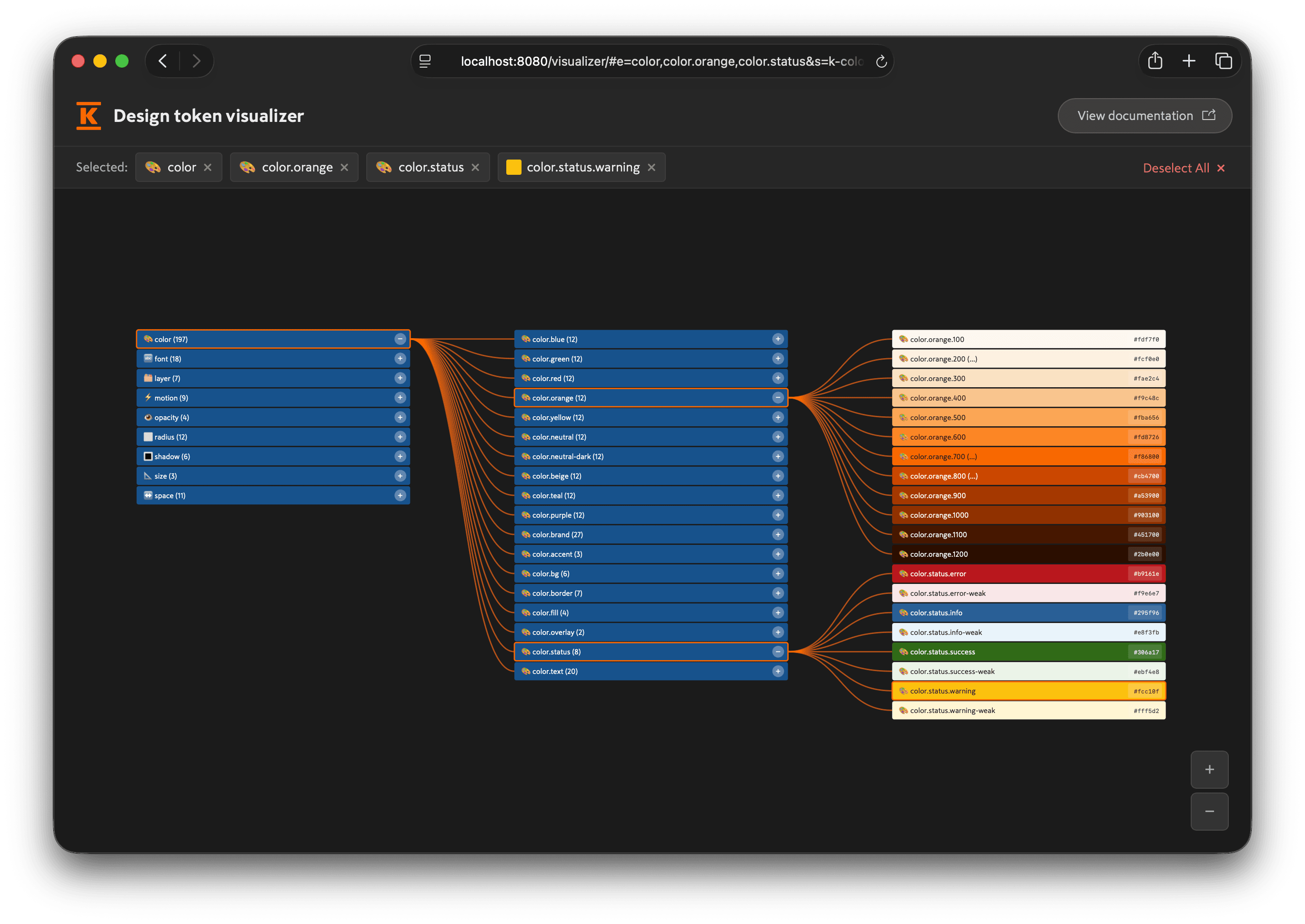
The design token visualizer is an interactive tool for exploring the full Kesko design token tree and understanding how the relationships work between groups, primitives, semantics, themes, and modes.